How to create a segment for serial returners
This article is intended for merchants who want to identify shoppers that Faslet currently classifies as serial returners and save them as a reusable Klaviyo segment.
You will learn how to create a segment based on the fasletSerialReturner property and how to review the matching profiles in Klaviyo. This takes about 5 minutes.
- Complete the Getting started with Klaviyo guide.
- Make sure you have access to the Klaviyo portal.
- Make sure the Klaviyo integration is already configured in the Faslet portal.
- Make sure Faslet data is already syncing to Klaviyo.
- If the resulting segment has zero profiles, Faslet may not have identified any serial returners yet.
Steps
In this guide, you will create a Klaviyo segment based on the boolean property fasletSerialReturner. Klaviyo will then keep that audience updated as profile data changes.
Creating a new segment
- Open the Klaviyo segment builder and enter
Serial Returnersas the segment name.
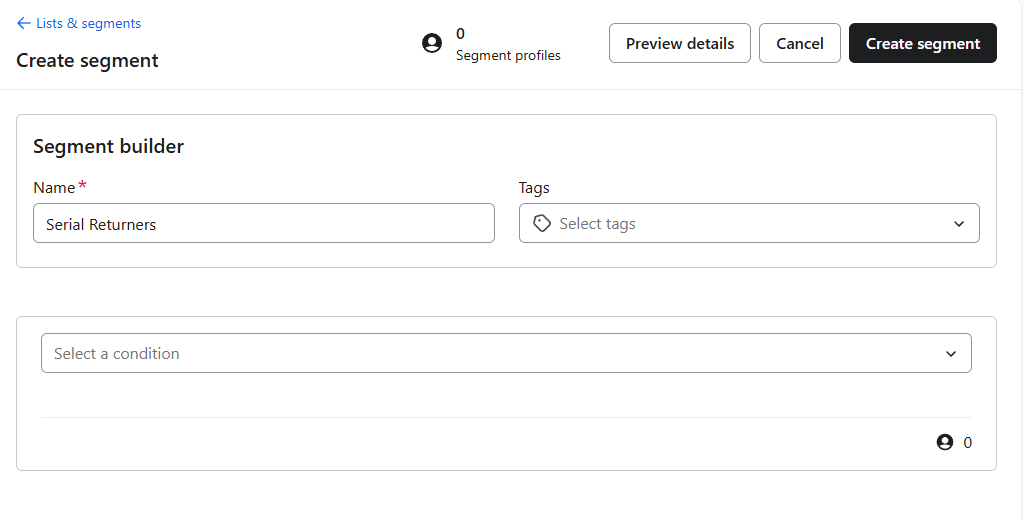
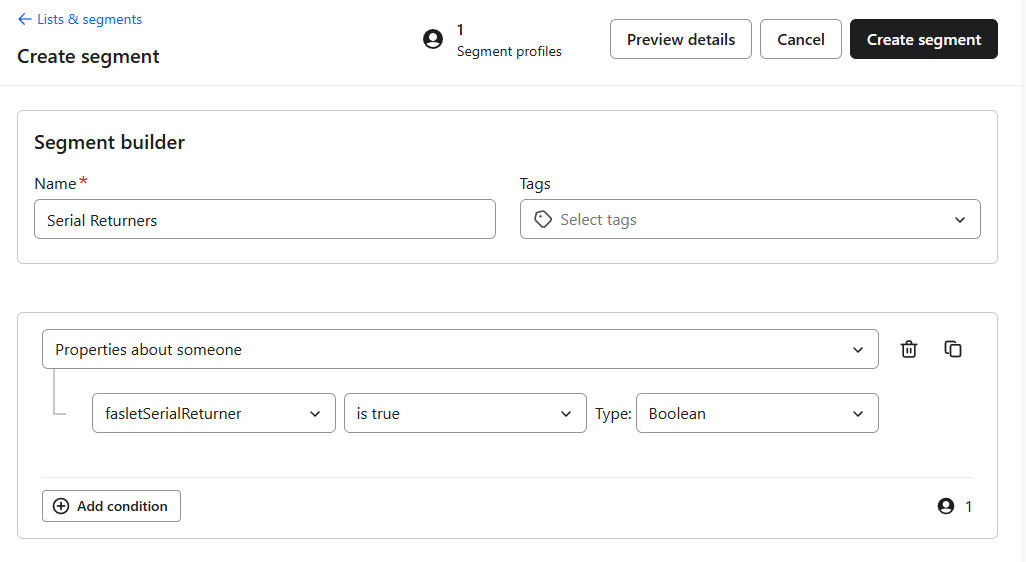
- Select Properties about someone.
- Change the type to Boolean if Klaviyo asks for a type.
- Select the property
fasletSerialReturner. - Click Create segment.
If the segment profile count is 0, Faslet may not have identified any serial returners yet.
Finished
You now have a segment for profiles that Faslet currently classifies as serial returners. You can use this segment for targeted campaigns, combine it with other Klaviyo filters for more precise targeting, or monitor it over time to understand how your return-related audience changes.