Sleak.chat
Sleak.chat connects to Faslet as an external provider through a custom action that calls the Faslet Assistant API v2 size-me endpoint.
The setup is done in your store's own Sleak account. There is no shared Faslet account in Sleak; every store adds the action to their own Sleak environment.
Before you start
You will need:
- A Sleak plan that allows custom actions / external providers.
- Your Faslet API token and Shop ID, from the Faslet Partner Portal.
- Faslet active on the products you want the chatbot to give size advice for.
Add the Faslet action
In the Sleak dashboard, add a new action and configure it as follows. Enable Send headers (shown as Aan in the Dutch interface).
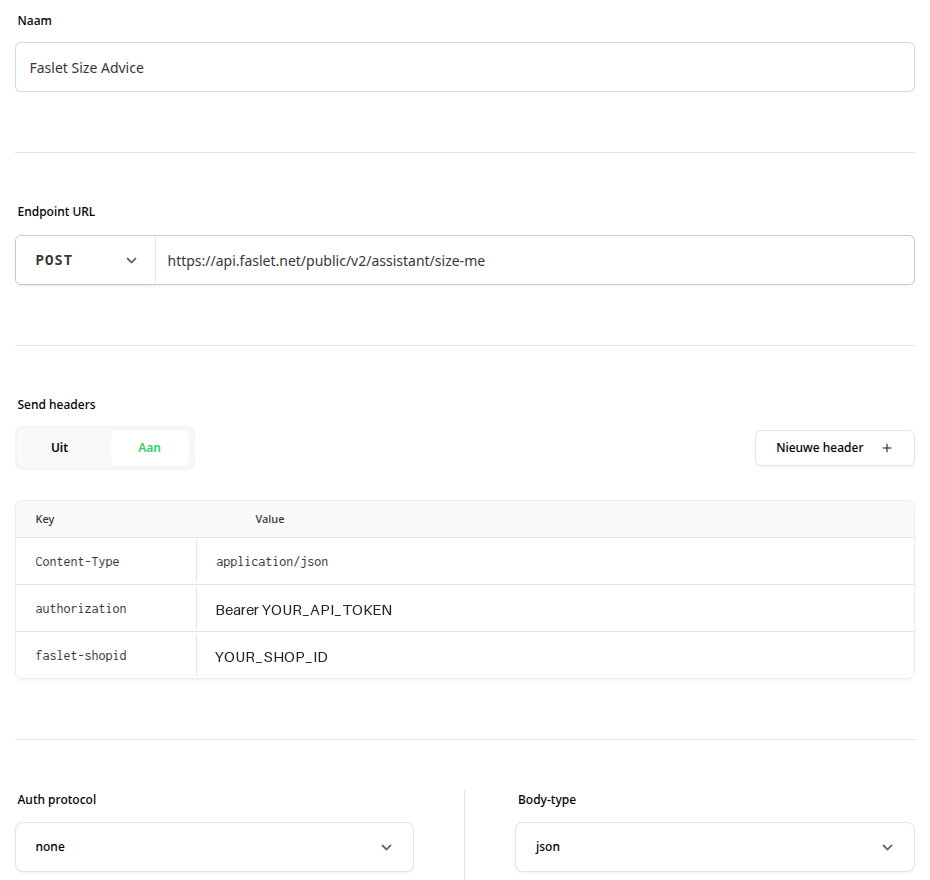
The screenshot shows a Dutch-language Sleak setup. Use your own API token and Shop ID in place of the placeholders.
Endpoint
POST https://api.faslet.net/public/v2/assistant/size-me
Authentication
Set the auth protocol to None. Authentication is passed in the headers instead.
Headers
| Header | Value |
|---|---|
Content-Type | application/json |
authorization | Bearer YOUR_API_TOKEN |
faslet-shopid | YOUR_SHOP_ID |
Replace YOUR_API_TOKEN and YOUR_SHOP_ID with the values from the Faslet Partner Portal.
Body
Set the body type to JSON with the following value:
{
  "product": {
    "productUrl": "{{product_url}}"
  },
  "profile": {
    "height": {{user_height}},
    "weight": {{user_weight}}
  }
}
user_height and user_weight are numbers, so they are not wrapped in quotes.
Variables
Add the three variables used in the body. The descriptions tell the Sleak assistant how to fill them in.
product_url
The current product page url (krijg je hieronder mee als 'Huidige pagina'). Do not send the store url, but use the current 'huidige pagina' url. Do not ask the user for this. This is a string. If you don't have it, ask for the product url.
user_height
The height of the user in CM. Always ask the user for their height unless they have previously given it. This is a number.
user_weight
The weight of the user in KG. Always ask the user for their weight unless they have previously given it. This is a number.
Prompt
Use this as the action prompt. It tells the assistant when to use the Faslet action and how to collect the inputs.
Gebruik deze tool als de gebruiker wil weten welke maat hij/zij nodig heeft voor een product. Je kunt deze tool alleen aanroepen nadat je user_height en user_weight hebt verkregen. Vraag de gebruiker naar zijn/haar lengte en gewicht en vul hiermee de variabelen user_height en user_weight in. De product_url moet de URL zijn van het product waarvoor de gebruiker een maatadvies wil. Als de gebruiker zich op een collectiepagina of een andere pagina dan een productpagina bevindt, vraag dan aan de bezoeker naar de productpagina te gaan om de vraag nogmaals te stellen. De user_id moet een ID zijn die de gebruiker uniek identificeert, zonder persoonsgegevens (PII) te bevatten. Vraag de gebruiker hier niet om. Gebruik deze tool pas als je de 'huidige pagina' daadwerkelijk weet. Verzin er nooit een en geef pas aan dat je gaat kijken naar de juiste maat, als je deze tool daadwerkelijk uitvoert.
English translation of the prompt
Use this tool when the user wants to know which size they need for a product. You can only call this tool after you have obtained user_height and user_weight. Ask the user for their height and weight and use them to fill in the user_height and user_weight variables. The product_url must be the URL of the product the user wants size advice for. If the user is on a collection page or any page other than a product page, ask the visitor to go to the product page and ask the question again. The user_id must be an ID that uniquely identifies the user without containing personal data (PII). Do not ask the user for it. Only use this tool once you actually know the 'current page'. Never make one up, and only say that you are checking the right size once you are actually running this tool.
Output schema and email validation
Leave the output schema and email validation at their default values.
How it works
- The shopper asks the Sleak chatbot which size to take on a product page.
- The chatbot asks for the shopper's height and weight (unless already given).
- Sleak calls the Faslet
size-meendpoint with the current product page URL and the shopper's height and weight. - Faslet returns the recommended size in
recommendation.size, which the chatbot passes on to the shopper.
If the request is missing inputs or the product can't be resolved, Faslet returns a non-resolved status. See the size-me endpoint reference for the full response and failure formats.
Tips
- The prompt and the
product_urldescription above come from a Dutch-language Sleak setup, where the current page is referred to as 'Huidige pagina'. Adjust the wording to match the language and page reference used in your own Sleak setup. - Size advice only works on product pages where Faslet is active. The prompt tells the assistant to send shoppers to a product page when they ask from a collection page.